

IoT PCB Design Guide — Power, RF & Size Optimization
What Makes IoT PCB Design Different?
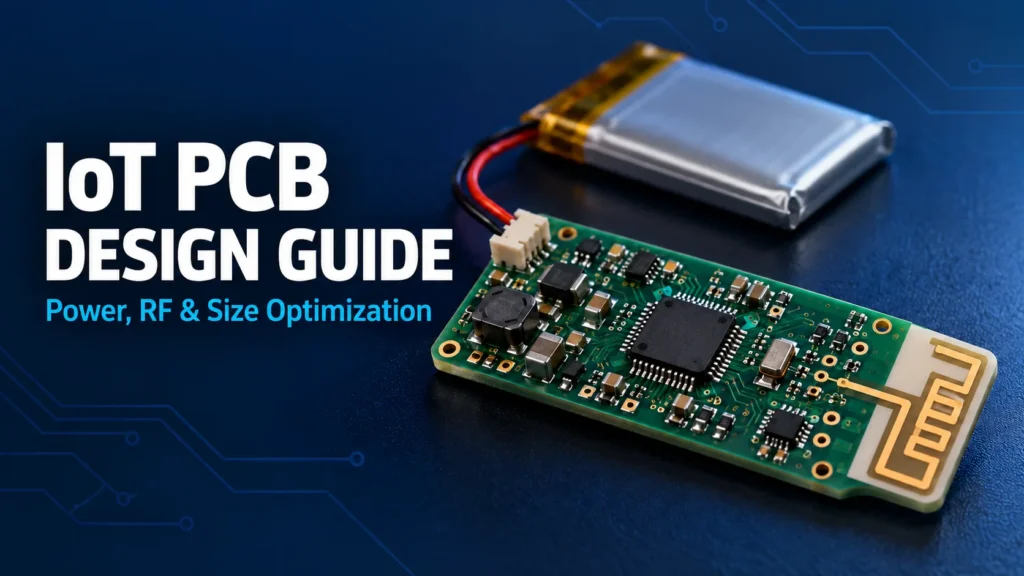
IoT PCB design balances energy use, wireless performance, and limited space. Start with the device’s operating modes and radio requirements. Reserve room for the antenna and battery before placing the remaining parts. Use HDI when routing density requires it. Then verify power and radio performance on assembled hardware inside the intended enclosure.
This guide focuses on compact, battery-powered wireless devices. An industrial sensor, wearable, and connected meter can have very different needs. Choose the reporting interval, wireless link, battery type, and enclosure before treating board size as a fixed target.
IoT circuit board design also crosses several disciplines. The bare PCB provides the connections and physical structure. Battery life and radio range depend on the assembled PCBA, firmware, antenna, and operating environment.
IoT Design Consideration
| Constraint | Design Technique | Impact |
|---|---|---|
| Sleep current | Review all powered devices and pin states | Helps identify loads that remain active |
| Radio current bursts | Check the supply path and local energy storage | Helps prevent supply droop during transmission |
| Antenna performance | Follow antenna-specific ground and keepout rules | Preserves the intended antenna environment |
| Switching noise | Keep switching loops compact and sensitive routes separate | Reduces opportunities for noise coupling |
| Limited routing area | Evaluate package fanout and suitable HDI structures | Can free routing space around dense packages |
| Prototype validation | Retain power, firmware, and RF test access | Makes faults easier to isolate before production |
Low-Power Layout Techniques
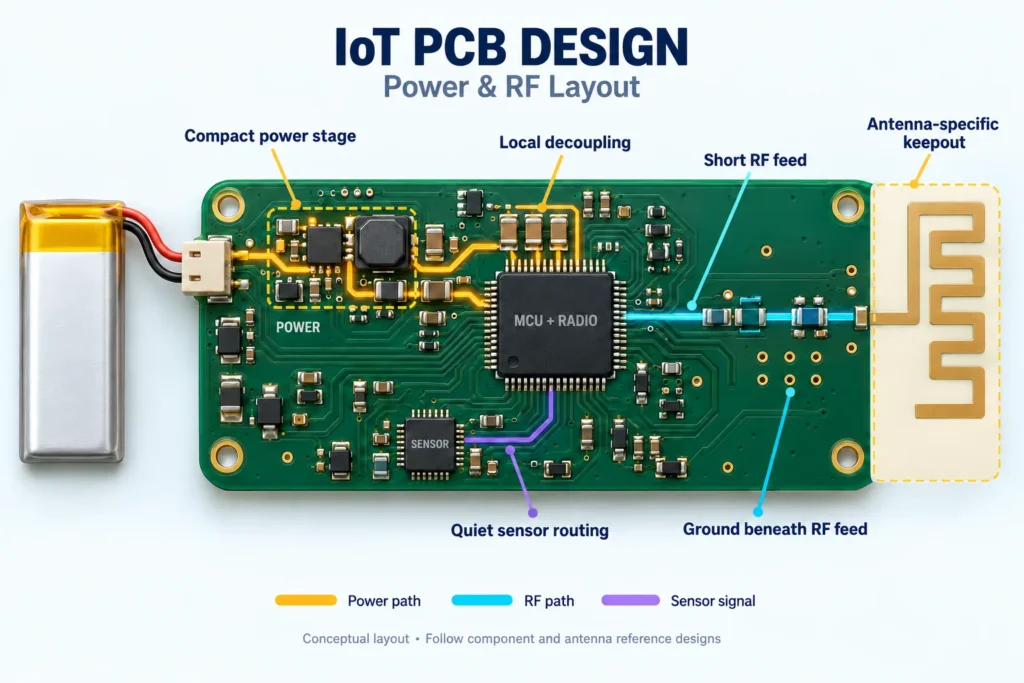
Low power PCB design starts with a system power budget. List sleep, sensing, processing, receiving, and transmitting states. Estimate the current and time spent in each state. Include regulators, external memory, sensors, indicator LEDs, and any circuits that stay powered.
Read current specifications carefully. TI’s guide to quiescent-current specifications distinguishes shutdown, nonswitching, and switching conditions. A regulator’s quoted quiescent current is not the total battery current. Compare parts under the operating conditions your design will actually use.
Give the circuit practical ways to enter low-power states. Check enable signals, pull-ups, and connections between separately powered devices. Review the selected ICs’ behavior when one supply is off. An active signal should not unintentionally power an otherwise disabled device through its input.
Firmware and hardware must agree on those states. Nordic’s power optimization guidance highlights peripheral use, logging, external memory, and GPIO configuration. A pull-up still draws current when its signal is held low. Confirm these conditions on the assembled board rather than relying on the MCU’s advertised sleep current.
PCB surface leakage is a separate issue from device quiescent current. Residue and moisture can create unwanted conductive paths, especially around high-impedance sensor inputs. Analog Devices’ precision-layout guidance explains why cleanliness matters for small signals. Agree on suitable assembly cleanliness controls; do not assume every unexplained current increase is a PCB leakage problem.
Provide a way to measure the battery current and isolate important supply branches. Capture the complete operating cycle, including wake-up and radio activity. Remove debug hardware from the final measurement configuration where appropriate.
RF Antenna Placement and Keep-Out Zones
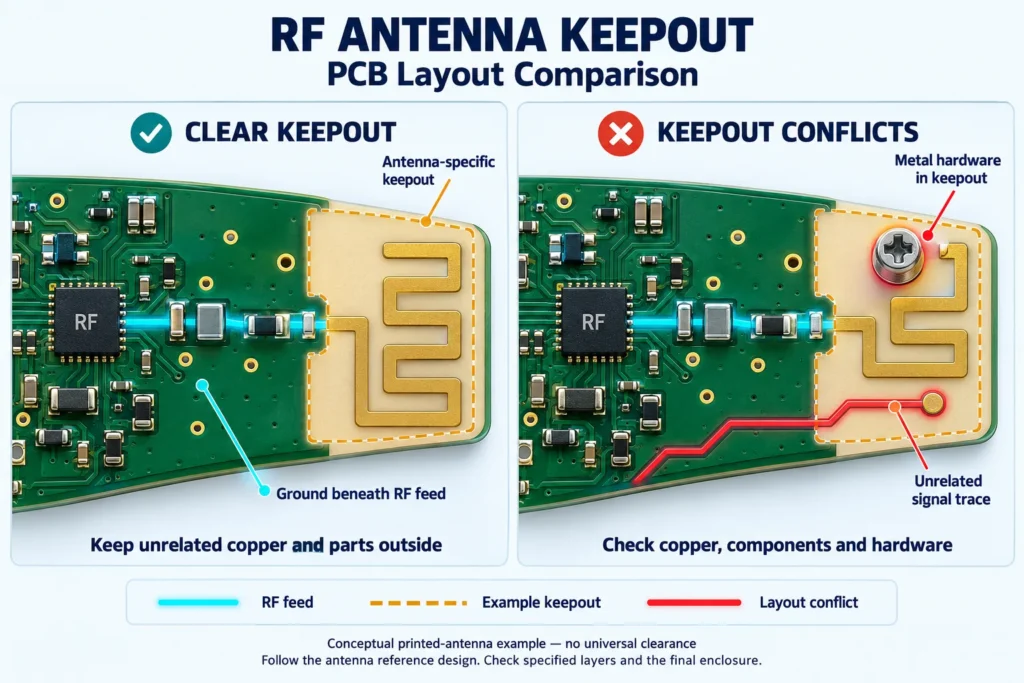
Plan RF antenna PCB layout before filling the board with components. Select the antenna type and position with the enclosure in view. Mark its specified copper, component, and mechanical restrictions in the layout. Check every affected layer, not only the top copper.
Follow the selected radio or module’s reference layout. For example, Espressif’s PCB layout guide separates the RF feed’s ground requirements from the module antenna’s keepout requirements. These areas do different jobs. Do not remove the feed’s reference plane simply because the nearby antenna needs clearance.
Use the required feed impedance and calculate the geometry from the actual stack-up. Copying a trace width from another board can give a different result. Keep the feed and matching components close to the recommended layout. Avoid unnecessary branches and abrupt routing changes.
There is no universal antenna clearance that works for every IoT product. PCB antennas, chip antennas, and external antennas have different mounting and ground requirements. Use the chosen antenna’s documentation. For broader routing considerations, see our high frequency PCB design guide.
Board changes can also affect the antenna. TI’s antenna selection guide explains the influence of ground geometry and the final casing. Reducing the PCB outline or changing nearby materials can require another matching review. Reserve space for the matching components specified for that antenna.
Test the final assembly with the battery, cables, fasteners, and enclosure in their intended positions. Check representative orientations and use conditions. A successful open-board radio test does not establish the finished product’s range or throughput.
Battery Integration and Power Management Layout
Choose the battery from its usable voltage range, load capability, temperature limits, and mechanical requirements. Capacity alone is not enough. Review the cell manufacturer’s specifications for the intended load profile. Rechargeable designs also need compatible charging and protection circuitry.
Radio bursts can expose weaknesses that a steady-load test misses. TI’s study of coin cells and peak current shows how internal resistance can cause supply voltage to fall under load. Check the chosen battery at relevant discharge states. Do not apply one coin cell’s test results to a different chemistry or product.
Review the complete path from the battery to the load, including contacts, connectors, traces, vias, and protection devices. Avoid narrow sections that create excessive voltage drop. Size local energy storage for the actual burst demand and permitted voltage change.
Place decoupling capacitors according to each IC’s reference layout. Keep their supply and return connections short. Follow the regulator’s capacitor requirements as well; adding arbitrary capacitance is not a substitute for checking stability and transient behavior.
For switching regulators, follow the device’s placement guidance. Analog Devices’ inductor-layout guidance emphasizes compact switching loops and separation from sensitive traces. Keep feedback and sensor routes away from noisy switching areas. Do not create ground-plane gaps as a general cure for interference.
During prototype tests, observe supply voltage at the radio while it transmits. Check startup and low-battery behavior too. A device that resets during a burst may need a supply-path correction, not a larger nominal battery capacity.
Miniaturization Through HDI Stack-Ups
Start miniaturized PCB design with the package fanout and mechanical layout. Keep the antenna region, battery connections, mounting features, and test access visible in that plan. Saving copper area is not useful if the product becomes difficult to assemble or verify.
High-density interconnect, or HDI, can help when conventional routing cannot escape a dense package within the available area. Altium’s microvia documentation describes these small interlayer connections in HDI structures. They can provide routing options without occupying every layer like a through-hole via.
HDI is not a requirement for every small IoT board. Compare a conventional multilayer option with an HDI option. Consider routing space, usable ground, assembly access, fabrication complexity, and cost. Neither a higher layer count nor smaller vias directly sets the device’s power consumption.
Agree on the stack-up and via structure with the fabricator before completing the layout. Confirm dielectric thicknesses, copper, line and space limits, via spans, and any via-in-pad treatment. Review reliability requirements for the expected assembly and operating conditions. Our HDI PCB design rules guide explains those manufacturing discussions in more detail.
Keep room for programming and testing as the board shrinks. Decide which functions need accessible pads or connectors. Check component spacing with the assembler, including inspection and rework access. A compact board still needs a workable production and troubleshooting plan.
Common IoT PCB Design Mistakes
The most useful prototype is one that reveals the product’s real constraints. Watch for these avoidable mistakes:
- Estimating battery life from MCU sleep current while leaving other circuits active.
- Copying an antenna layout without checking the host board, stack-up, or enclosure.
- Moving the battery or adding metal hardware after RF validation without repeating the affected checks.
- Shrinking the board before reserving decoupling, matching, programming, and test access.
- Measuring only average current and missing short supply drops or unintended wake-ups.
Record the firmware revision, power settings, battery condition, and assembly configuration for each test. Compare sleep current, operating-cycle energy, supply stability, and wireless results. Change one suspected cause at a time where practical.
Before releasing manufacturing files, close the relevant design and test findings. Identify which changes require another measurement. A new enclosure, component substitution, or board outline can invalidate part of an earlier evaluation.
FAQ
What PCB stack-up is best for small IoT devices?
There is no single best stack-up. Start with the radio reference design, package fanout, power routing, and mechanical constraints. Preserve the required reference planes. Use HDI only where its routing benefits justify the added manufacturing complexity.
How close can components be placed to an RF antenna?
Follow the selected antenna or module’s keepout drawing. Check copper on all specified layers and nearby mechanical parts. There is no universal distance. Validate the finished assembly, because the enclosure and surrounding materials can affect the result.
Does HDI reduce power consumption on IoT boards?
Not by itself. HDI mainly helps with routing density and board space. Energy use still depends on components, operating modes, power conversion, and radio activity. Measure the assembled system before claiming a battery-life improvement.
What causes battery drain issues traced back to PCB design?
Possible causes include always-powered loads, unsuitable pin states, unintended current paths, and leakage from contamination. Power-management choices and firmware activity also matter. Measure individual supply branches and operating states before deciding that the bare PCB is responsible.
Designing a Compact IoT Device?
Share your proposed board with Benlida before finalizing the manufacturing package. If dense routing calls for HDI, review our HDI PCB manufacturing page and request confirmation of the stack-up, via structure, and applicable design limits.
For a bare-board discussion, provide Gerber or ODB++, drill data, a fabrication drawing, quantities, and revision details. Include the antenna keepout drawing and impedance requirements. For PCBA, add the BOM, placement file, assembly drawing, and programming or test requirements.
State the unresolved power, RF, or size constraints. Ask Benlida to confirm the available DFM review and manufacturing scope for your project.